

What an LLM calculates
In the first chapter, we introduced the weights of an LLM. These are very large tables of numbers that represent patterns learnt during training. In mathematics, a rectangular table of numbers is called a matrix. When an LLM processes text, these matrices are repeatedly combined in calculations. Much of this work consists of multiplications and additions.
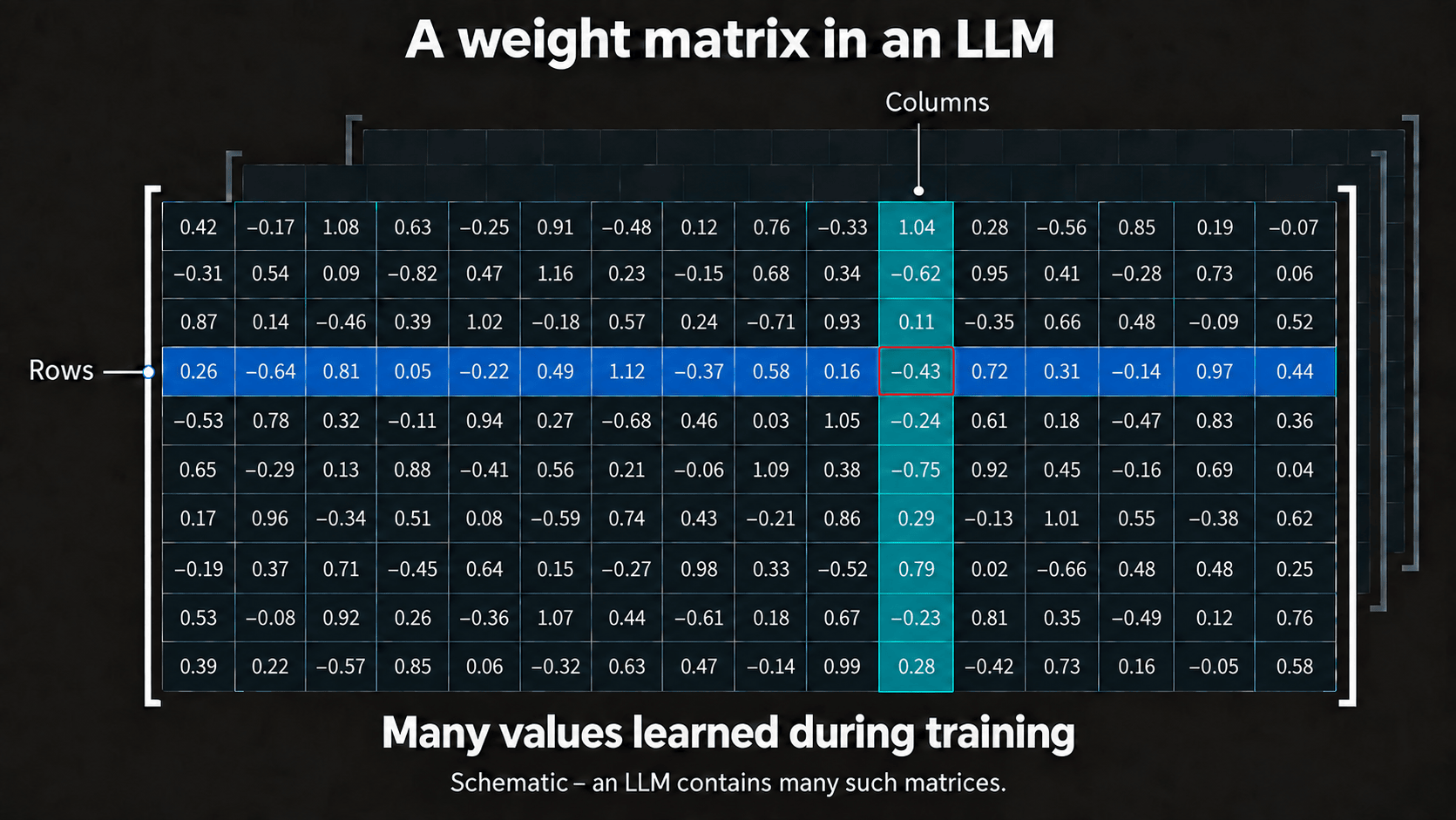
Image content as text
The diagram shows a rectangular table with ten rows and sixteen columns. Each cell contains a positive or negative decimal value. One row is highlighted in blue and one column in turquoise; their shared cell is outlined in red. Further matrices appear dimly in the background. The values schematically represent weights adjusted during training. An LLM contains many such matrices.
The same calculation must be applied to a great many numbers. Each individual result depends on the numbers involved, but the operation remains the same across large groups. This allows the overall workload to be divided into many small packages that can be processed at the same time. GPUs were designed for precisely this kind of high throughput. [1] [2]
A few flexible cores, many parallel processing units
A CPU must handle very different kinds of work quickly. It runs the operating system, responds to input, and executes programs containing many decisions and changing sequences of operations. It therefore has a comparatively small number of very capable cores designed to complete individual tasks with low latency. [1] [2]
A GPU has a different goal. It contains a great many simpler processing units and achieves its performance by distributing large amounts of similar work. On NVIDIA GPUs, groups of threads are executed together. Within such a group, the same program generally runs on different data. The hardware is used most efficiently when every thread follows the same path through that program. [3]
This also explains why CPU and GPU “core” counts cannot be compared directly. An individual GPU processing unit is not a small replacement for a complete CPU core. The two architectures devote their area and energy to different abilities: a CPU prioritises fast and flexible individual work, while a GPU prioritises a great deal of simultaneous computation.
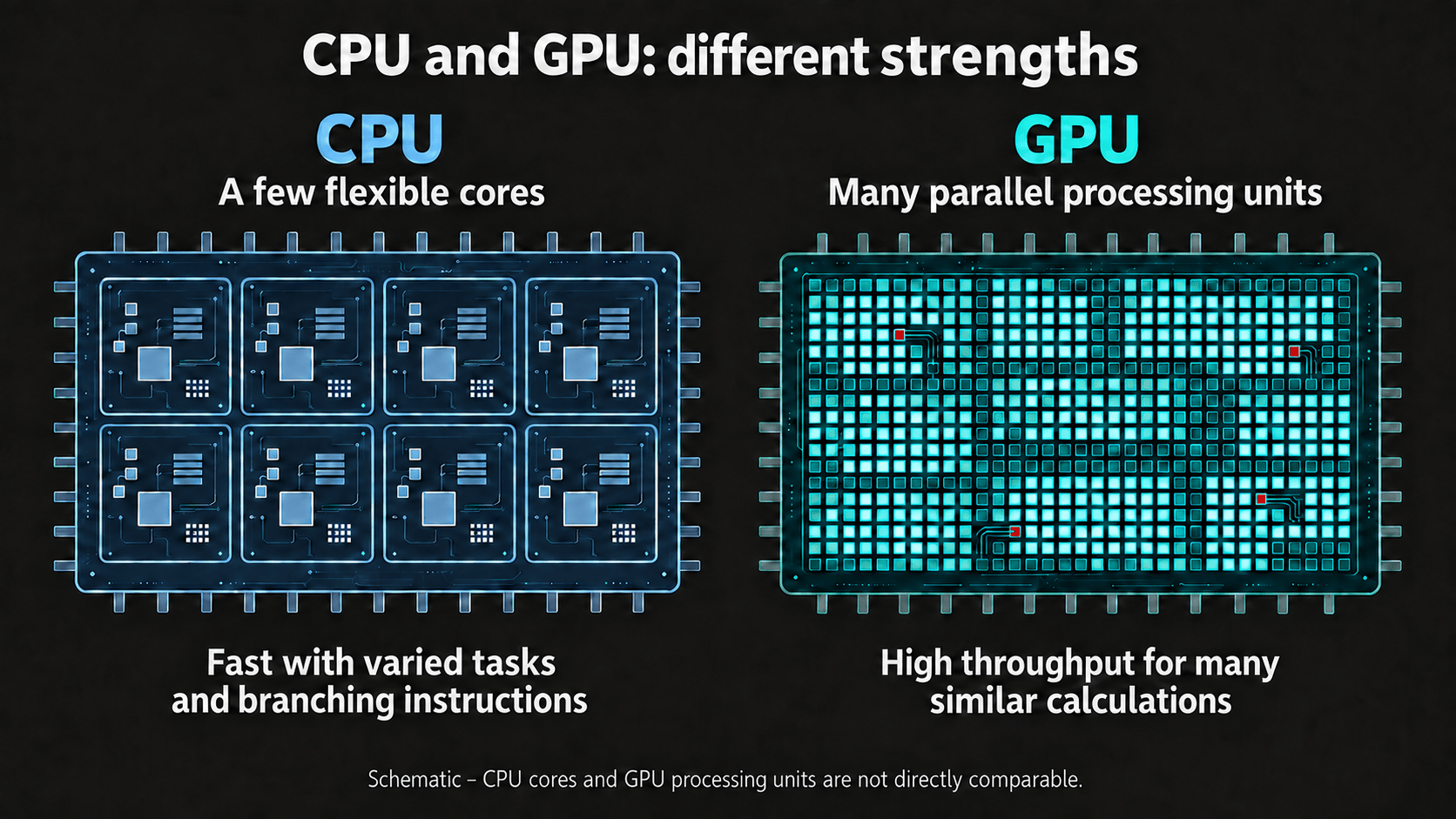
Image content as text
The diagram compares the different strengths of a CPU and a GPU. On the left, a CPU contains eight large cores. They represent a few flexible cores that handle varied tasks and branching instructions quickly. On the right, a GPU contains a dense grid of many small processing units. A large proportion of them are illuminated at the same time, representing high throughput across many similar calculations. CPU cores and GPU processing units are not directly comparable; their number and arrangement are schematic.
Why this suits an LLM
The large matrix calculations in an LLM provide a GPU with many similar packages of work. Rather than finishing one long calculation after another, the GPU can begin numerous partial calculations in parallel. Its advantage does not come from completing one multiplication especially quickly, but from the number of multiplications and additions it can process together.
This difference can be described in terms of latency and throughput. Latency is the time one task takes to produce its result. Throughput describes how much total work a system completes within a given period. CPUs are designed for low latency when handling demanding individual tasks. GPUs give up some of that flexibility to achieve very high throughput on suitable workloads. [2]
The processing units must be fed
Many processing units only help if they receive new numbers in time. A discrete graphics card therefore has its own memory attached directly to the GPU. This is VRAM. Its high bandwidth allows large amounts of data to move quickly between memory and the processing units. [3] [4]
If a model fits into VRAM, its weights can remain available there for the calculations. If data must constantly be transferred between the computer’s main memory and the graphics card, those transfers take time. On a small workload, this overhead can eliminate the GPU’s speed advantage entirely. [2]
Why a GPU is not always faster
Not every task can be divided into many similar packages. Some calculations depend on the previous step. Others contain many branches in which different parts must follow different instructions. On a GPU, processing units may then remain idle or have to wait for one another. Small workloads may also provide too little work to offset the overhead of starting, distributing, and transferring them. [3] [4]
Even a highly parallel program usually retains parts that must run in sequence. These serial parts limit how much faster the whole program can become by adding more parallel processing units. Communication, coordination, and data movement add further overhead. [5]
The choice is therefore not CPU or GPU. The CPU controls the general flow of the program, prepares work, and handles tasks that require flexibility or fast individual responses. The GPU processes the large, suitable blocks of calculations. This division of labour is particularly effective for an LLM because its matrix calculations provide so much parallel work.
Deeper into the Rabbit Hole
If you would like to explore the subject further, these texts and videos develop the main technical points:
Texts
- NVIDIA: CUDA C++ Best Practices Guide – parallelism, data transfers, memory access, and the practical limits of GPU acceleration.
- AMD ROCm: Understanding GPU Performance – computing power, memory bandwidth, and overhead as possible bottlenecks.
- Lawrence Livermore National Laboratory: Introduction to Parallel Computing Tutorial – a vendor-neutral introduction to parallelism and its limits.
Videos
- Computerphile: CPU vs GPU (What’s the Difference?) – a short and accessible comparison.
- Branch Education: How do Graphics Cards Work? Exploring GPU Architecture – a detailed visual explanation of the GPU, its processing units, and graphics memory.
- Stanford CS149: GPU Architecture and CUDA Programming – a technical university lecture for further study.
Sources
- Intel: CPU vs. GPU: What’s the Difference?.
- NVIDIA: CUDA C++ Best Practices Guide.
- NVIDIA: CUDA Programming Guide — Programming Model.
- AMD ROCm: Understanding GPU Performance.
- Lawrence Livermore National Laboratory: Introduction to Parallel Computing Tutorial.