

As we saw in “How does an LLM work?”, each request to a language model is initially a self-contained operation. Why, then, does a chat seem as though the machine remembers our conversation? Because the software includes earlier messages with each new request. The context window limits how much the model can process at once. Its size is measured in tokens. [1]
The available context window depends on the model and the server settings. Some models can process around 8,000 tokens at once; others can handle a million or more. The server can further restrict the usable size. The following illustrations show what goes into a context window and how it fills up during a conversation. [1] [2]
1. The first request
At the start, the context contains the system prompt with the basic instructions and your first message. There is no LLM response yet. Even this first request already occupies part of the window. [1]
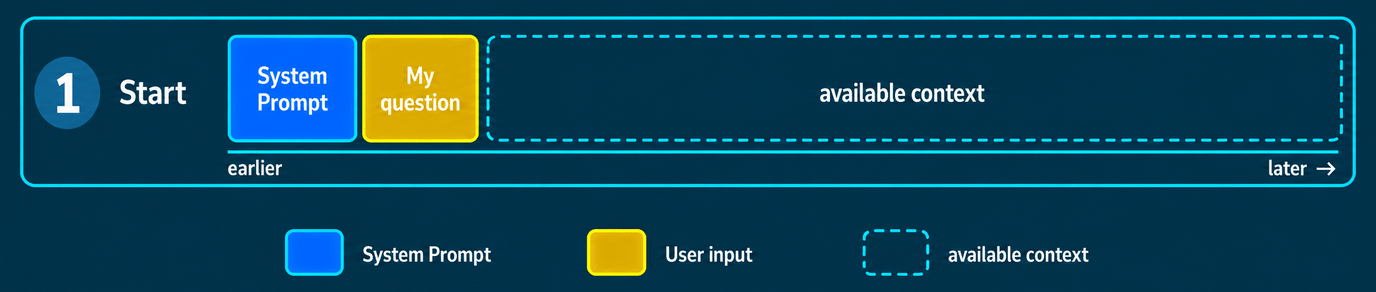
Image description as text
The context window starts on the left with the blue system prompt and the gold first request. There is no model response yet. The rest of the bar shows available context. Time runs from left to right. Widths are schematic, not actual token measurements.
2. The conversation grows
The response adds more text. With the next request, the software includes the conversation so far alongside your new message. If the LLM uses tools, their calls and outputs also become part of the context. It grows with each round of conversation. Sending the conversation again does not give the model a lasting memory. [1]
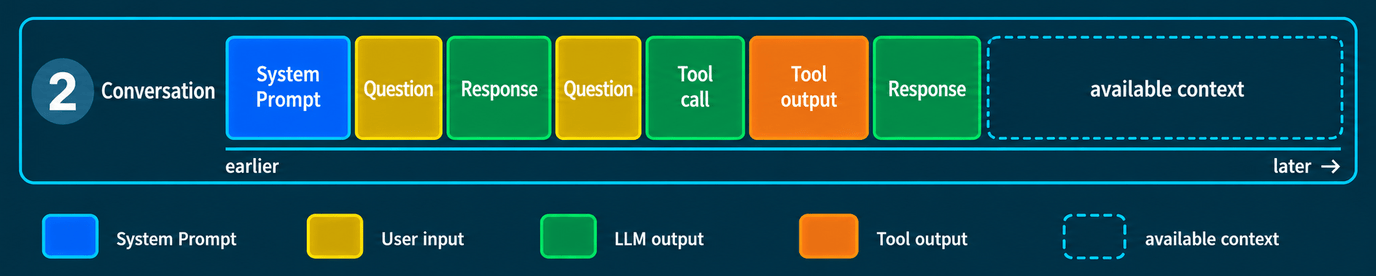
Image description as text
The blue system prompt is followed by a gold request and a green response. A second request leads to a green model tool call, then a larger orange tool output and finally a green response. The tool call is model output, not tool output. Available context remains on the right. All widths are schematic, not token measurements.
3. What is still relevant?
Discarded approaches, outdated drafts and questions that have long since been resolved remain in the conversation. They take up space alongside the information needed for the current task. In a long or contradictory conversation, the LLM may overlook relevant details or follow existing instructions less reliably. This does not necessarily happen in every long chat, and the token count is not the only factor. [3]
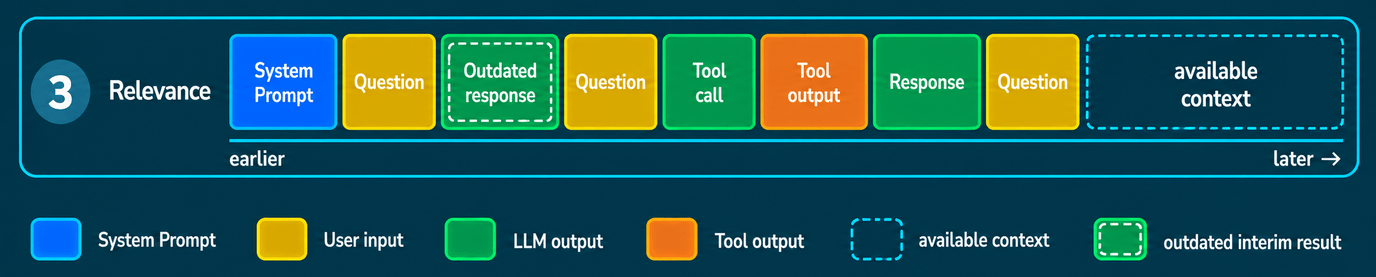
Image description as text
The context window still contains the blue system prompt, two conversation rounds with a tool call and a larger tool output, plus another request. The first green response has a white dashed inner outline marking an out-of-date interim result. Newer information can supersede earlier interim results. The old content remains present. The mark indicates neither actual deletion nor automatic general drift. Widths are schematic, not token measurements.
4. The window fills up
The context cannot occupy all the available space if there is still a response to generate. Its tokens need room too. How much space is allowed for that response, and its maximum length, depend on the model and the software. The chat software or harness may also impose its own limit before the model's limit is reached. What happens to the conversation at that point depends on the software. [1] [2]
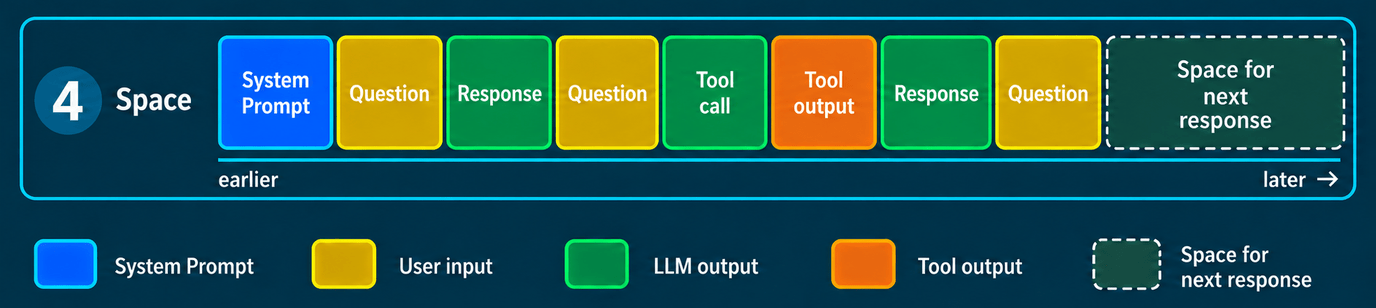
Image description as text
On the left are the blue system prompt and the existing conversation history, including the latest request. This existing content is the input. On the right, a subtly tinted block with a dashed white border illustrates space for the next response, which has not yet been generated. It is not existing model output or an actual size prediction. The schematic shows that the response also has to fit inside the limited context window. No fixed token values are given.
5. The Dumb Zone
This is my name for the point at which the context has become so tangled for my task that the responses become less precise or unusable. Where it starts depends on the task, the content and the server. In my experience, I reach this zone by around 70 to 80 per cent of the available context window at the latest. With larger context windows, I often notice it starting at 50 per cent. These are personal observations, not fixed technical limits. I want to reduce the context before I reach that point. Compaction or a session handoff are two ways to do that.
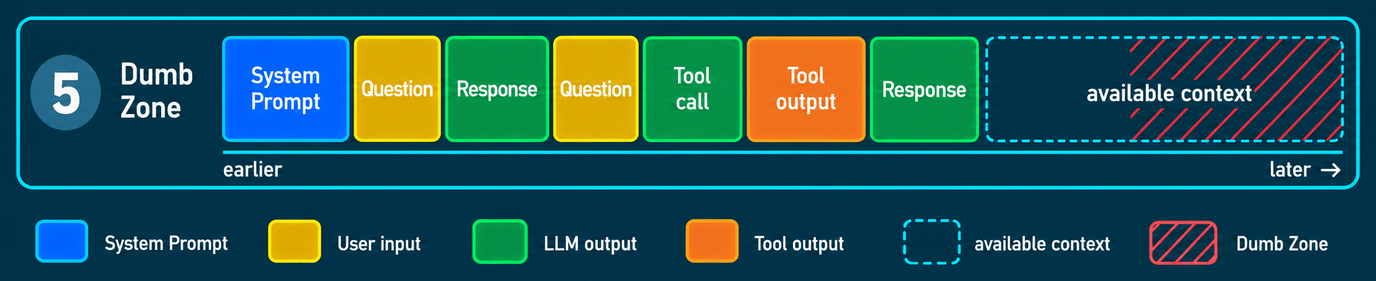
Image description as text
The blue system prompt is followed by two gold requests, green responses, a green tool call and an orange tool output. Available context remains on the right. Red hatching overlays its right-hand portion to mark the Dumb Zone. Its schematic starting point is a personal guide, not a universal threshold or technical limit. Actual usability depends on factors including the task and mix of context. The hatching is not reserved memory and does not imply automatic deterioration. Widths are schematic, not actual token measurements.
6. Compaction
During compaction, your harness or chat software asks the LLM to summarise the session so far. The software then replaces the old conversation in the context with that summary. This frees up space, and the conversation continues with the condensed context. Some harnesses let you guide compaction with your own prompts. How much of the work so far survives depends on the quality of the summary. [3] [4]
The illustration shows the basic idea. Depending on the harness, recent messages may also be retained alongside the summary. [4]
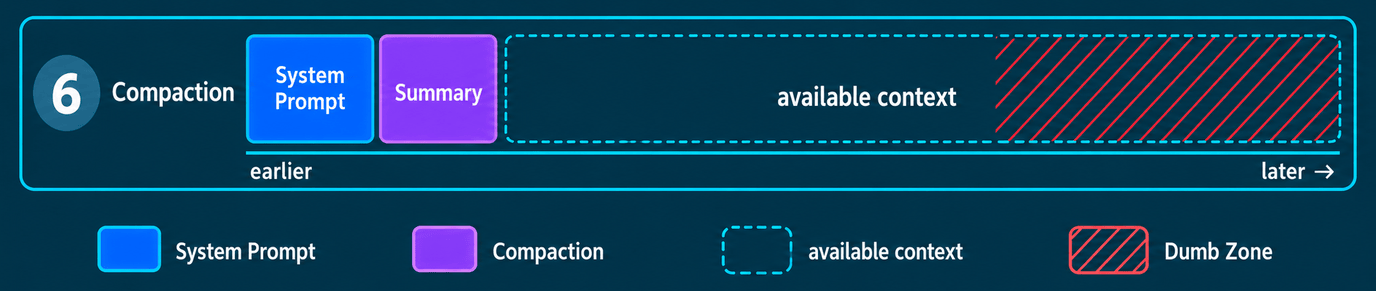
Image description as text
One context bar shows the same session after compaction. The blue system prompt is retained. A compact purple summary replaces the old conversation history, leaving substantially more available context. No new session is started. Red Dumb Zone hatching remains visible in the right-hand portion of the available context. Its schematic starting point is a personal guide, not a technical limit or memory reservation. All widths are schematic, not token measurements.
7. Session handoff
During a session handoff, the LLM prepares a handover for a new session. It records the current goal, the state of the work, important decisions and the next steps. The new session starts with this handover rather than the previous conversation. The emphasis is less on summarising the conversation and more on making it possible to continue the work. Here too, the result depends on which information is carried over and how reliably the handover describes it. [5]
One practical example is my project pi-blitz-handoff, which organises handoffs between Pi sessions. I introduce it in a separate article in the Pi.dev-Toolbelt collection.
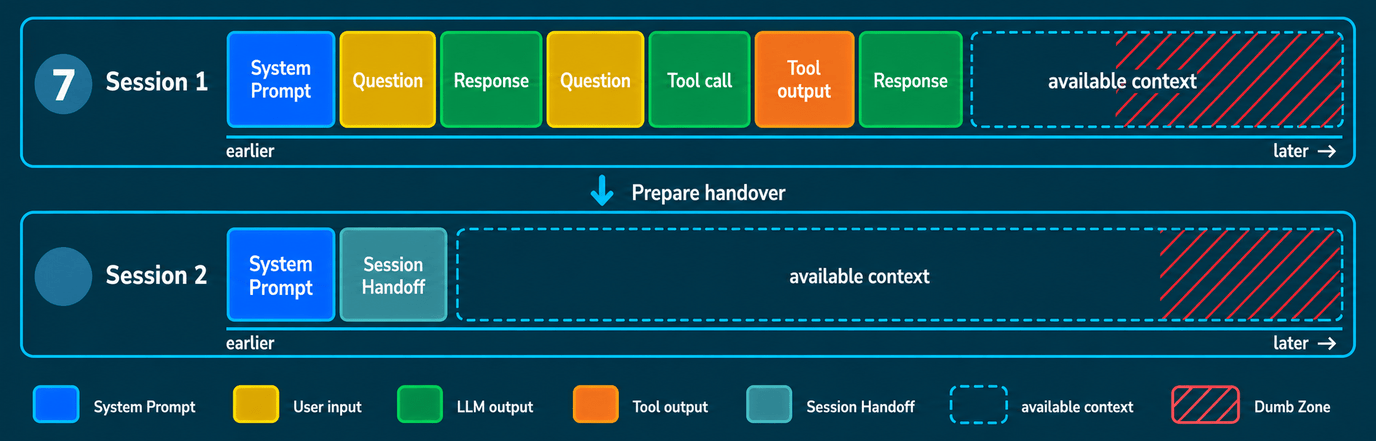
Image description as text
Two equally wide context bars show two separate sessions. Above, session 1 contains the blue system prompt and its old history of requests, responses, a tool call and a tool output. The connecting arrow denotes summarising for the handoff. Below, session 2 begins only with a blue system prompt and a muted turquoise session handoff, followed by available context. There is neither a new user request nor an LLM response in the lower bar. The handoff transfers summarised information, not the entire old history. Both bars carry red Dumb Zone hatching in the right-hand portion of the available context. Its schematic starting point varies between the sessions. This personal guide is not a technical limit or memory reservation. Widths are schematic, not token measurements.
Compaction vs. handoff — a flamewar
There is no need to turn these approaches into rival camps. Compaction condenses the conversation so it can continue. A handoff shapes the context of a new session around the work ahead. Which approach fits depends on what you want to preserve and how the software handles it. Both can lose important details. Neither is better for every task.
Deeper into the Rabbit Hole
Videos in English
- IBM Technology — What is a Context Window? Unlocking LLM Secrets — Martin Keen explains tokens, self-attention and the challenges of limited context windows. Around 12 minutes.
- Matt Pocock — Most devs don’t understand how context windows work — context limits when working with coding agents, the “lost in the middle” problem and managing long conversations. Around 10 minutes, with examples of compaction and extra context introduced by MCP servers.
- Marina Wyss — Context Engineering in 29 Minutes: Complete Course — a longer overview of context strategies for agents, common failure modes and practical approaches. Around 29 minutes. The video is sponsored by Kimi.
Texts
- Anthropic — Context windows — how messages, tool results and generated responses count towards the window. The details describe Claude, not every model.
- Anthropic — Effective context engineering for AI agents — selecting useful context, compaction, external notes and subagents. An engineering perspective from one provider.
- Liu et al. — Lost in the Middle — a study of retrieving information from long inputs. The abstract describes dependence on where relevant information appears. It does not establish a general 70 per cent limit. [6]
Sources
- Anthropic — Context windows.
- vLLM — Engine Arguments. Server configuration example.
- Anthropic — Effective context engineering for AI agents.
- Anthropic — Compaction overview.
- Mirco Blitz — pi-blitz-handoff — README v1.2.4. Published product version 1.2.4.
- Liu et al. — Lost in the Middle: How Language Models Use Long Contexts. Abstract read; the full paper was not reviewed for this article.