


The largest block: the weights
The largest block of memory used by an LLM consists of its weights. These are numerical values that were adjusted repeatedly during training. To generate text, the model must keep those weights in memory that its processing units can access. [1]
Model names often contain a figure such as 27B. The B stands for billion.
Take the popular Qwen3.8-27B model. It has roughly 27 billion weights. If each weight were stored using 16 bits, or two bytes, the calculation would be:
27 billion × 2 bytes = approximately 54 gigabytes
A much larger example is DeepSeek-V4-Pro. According to its developer, it has 1.6 trillion weights in total, of which 49 billion are active for each token. [2]
At 16 bits, all of its weights would occupy approximately 3.2 terabytes – nearly 60 times as much as the 27B model. Activating only part of the model for each token reduces the amount of computation. All the weights still need to be kept in memory.
The figures of 54 gigabytes and 3.2 terabytes describe only the weights. While the model is running, it also needs memory for temporary intermediate results. The KV cache adds another requirement that grows with the context being used.
Memory while generating an answer
The temporary intermediate results form a working area. Its size depends on the software, the model architecture, and the request. Some parts can be released after a calculation or reused for the next step.
The model also uses a KV cache, short for key-value cache. It stores intermediate results already calculated for the preceding text. The model can reuse them instead of performing the same calculations for every new token. [3]
The KV cache is neither additional knowledge nor permanent memory. It grows with the context being used.
The regular 16-bit KV cache of Qwen3.8-27B adds roughly 64 KB for every token. This value follows from the full-attention layers, KV heads, and head dimension of the model variant considered here. [4]
| Context | Calculation for each running request | Additional memory | With several parallel requests |
|---|---|---|---|
| 32K | 32K × 64 KB | about 2 GB | 2 GB × number of requests |
| 64K | 64K × 64 KB | about 4 GB | 4 GB × number of requests |
| 128K | 128K × 64 KB | about 8 GB | 8 GB × number of requests |
| 256K | 256K × 64 KB | about 16 GB | 16 GB × number of requests |
A larger cache allows more context and therefore longer sequences before older content has to be removed or summarised. When several requests run in parallel, each one needs its own cache.
How much text is that?
A token is neither a single character nor always a complete word. A common word may consist of one token, while a longer or unusual word may be divided into several. The amount of text can therefore only be estimated roughly.
| Context | Words (approx.) | Comparable amount of text |
|---|---|---|
| 32K | 20K–25K | one quarter of Harry Potter 1 |
| 64K | 40K–50K | half of Harry Potter 1 |
| 128K | 80K–100K | Harry Potter 1 |
| 256K | 160K–200K | Harry Potter 1 and 2 together |
The book comparisons use the English word counts and indicate only the general scale. [5] The actual number of tokens depends on the language, spelling, and tokenizer being used.
Where the memory is located
The amount of memory required remains the same, but its arrangement differs. In a conventional PC, the CPU and graphics card have separate RAM and VRAM. Data needed by the GPU must be transferred between these memory areas. [6]
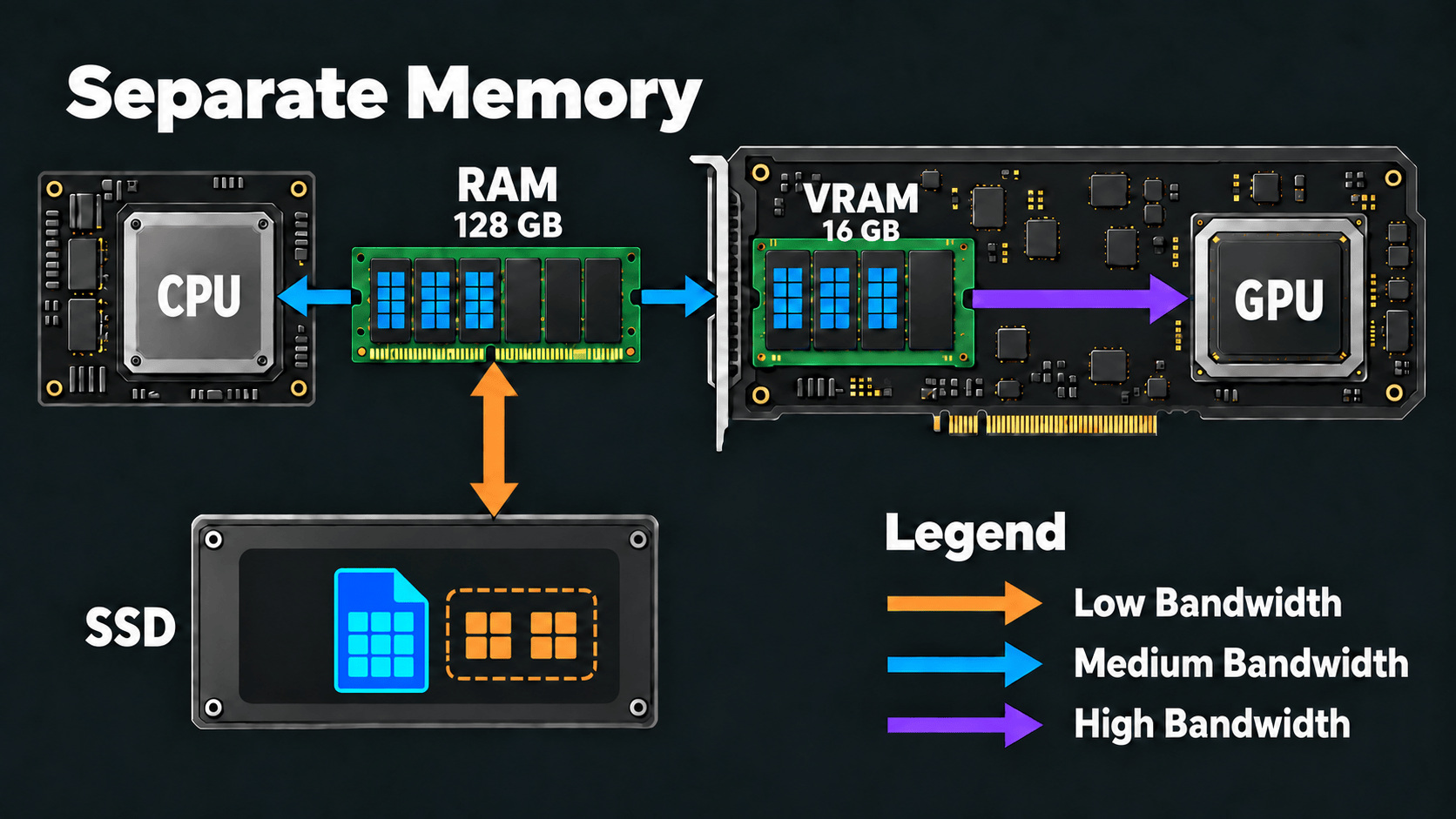
Image content as text
The diagram shows a CPU and ordinary RAM on the left, and a separate graphics card with its own VRAM and GPU on the right. Blue arrows connect the CPU, RAM, and VRAM; a purple arrow connects the fast VRAM to the GPU. An SSD below the RAM is connected by an orange arrow. The legend assigns low bandwidth to orange, medium bandwidth to blue, and high bandwidth to purple. The capacities of 128 GB of RAM and 16 GB of VRAM are illustrative examples rather than general requirements.
With Apple silicon and systems such as NVIDIA DGX Spark, the CPU and GPU can instead access the same pool of unified memory. [7] [8]
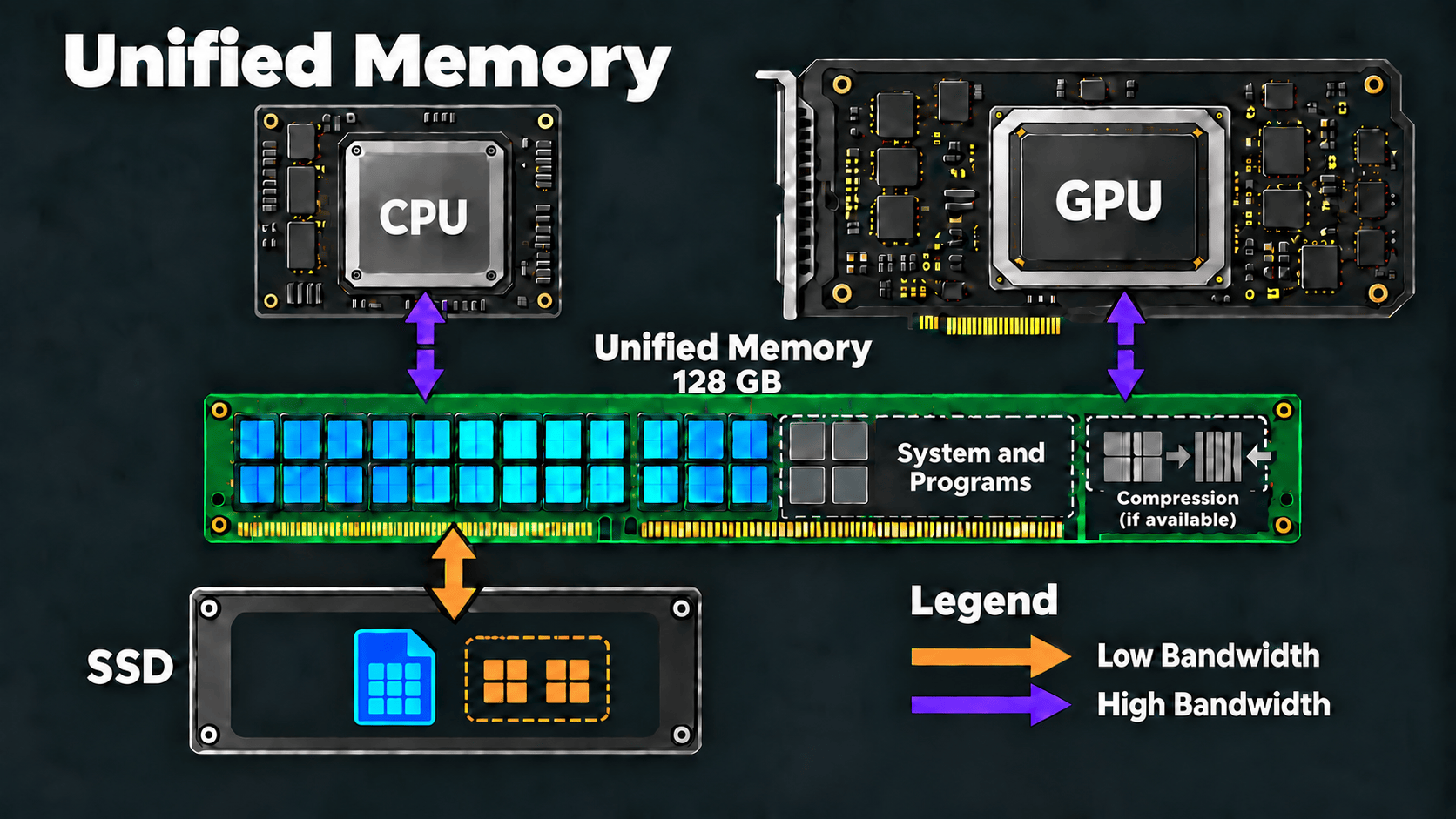
Image content as text
The diagram shows a CPU and GPU connected by purple arrows to one unified memory pool. Part of that memory is occupied by the system and programs, and possible memory compression is also indicated. An SSD is connected by an orange arrow representing lower bandwidth. The displayed 128 GB is an example. The essential point is that the CPU and GPU use the same memory rather than separate RAM and VRAM pools.
In either arrangement, the important question is whether the weights, working data, and KV cache remain in memory that the GPU can reach quickly. If the system has to move data to the SSD, text generation becomes dramatically slower.
Memory matters – but it is not everything
An LLM needs a great deal of memory because billions of weights have to remain available. Working data and a KV cache that grows with the context are added while it generates an answer. Parallel requests multiply this additional requirement.
Enough memory determines whether a model can run at all. Its speed also depends on how quickly the GPU can access that data.
Even so, Qwen3.8-27B can run on computers that cannot provide 54 gigabytes for its weights alone. The next chapter explains how: through quantisation.
Deeper into the Rabbit Hole
If you would like to explore the subject further, these texts and videos develop the main technical points:
Texts
- Hugging Face: Optimizing LLMs for Speed and Memory – weights, data types, and the principal memory limits during inference.
- Hugging Face: Cache Strategies – KV caches, offloading, and different cache strategies.
- Apple: Choosing a Resource Storage Mode for Apple GPUs – shared system memory and the access paths available to the CPU and GPU.
- NVIDIA: DGX Spark – a concrete system with 128 GB of coherent unified memory.
Videos
- IBM Technology: How KV Cache Speeds Up LLMs for Faster AI Models on GPUs – a compact introduction to the KV cache, prefill, and decode.
- PyTorch: Understanding the LLM Inference Workload – NVIDIA's Mark Moyou looks more deeply at models, hardware, quantisation, and inference.
Sources
- Hugging Face Transformers: Optimizing LLMs for Speed and Memory.
- DeepSeek: DeepSeek-V4-Pro.
- Hugging Face Transformers: Cache Strategies.
- Hugging Face: configuration of the Qwen3.8-27B variant considered here.
- Word Counter: How Many Words Are in Harry Potter?.
- NVIDIA: CUDA C++ Best Practices Guide.
- Apple Developer Documentation: Choosing a Resource Storage Mode for Apple GPUs.
- NVIDIA: DGX Spark.